Showing posts with label Blogging Tips. Show all posts

Wednesday, June 26, 2013

Working with New HTML Template Editor of Blogger!


New HTML Template Editor for Blogger


If you're using a blogger blog, then you should notice some major changes in its HTML editor. Google made those changes couple of months ago. You will see the code is colored, folded and very much structured. You will also notice some new buttons which were not available earlier. What are the uses and benefits of these buttons? Read more to know . . .


Only a few days ago, I published a post on Blogger vs. WordPress. In that post I said - WordPress is matured, but there is a continuous improvement on Blogger. And the new HTML template editor of blogger is a part of that improvement! Today I will discuss about how to work with the new html editor. 


I was very much angry after such a change in the template editor. Because several times I was puzzled by the new options and interface. But as soon as I got familiar with the new editor, I really like it. If you're familiar with all the new options I think you will also like it. 


Okay let's start. Sign in to your blogger. Go to the design or dashboard. Then hit on the Template tab from the left pane. Now click on Edit HTML button. Your template will be appeared as the image below:   


Image of New HTML Template Editor of Blogger


Now closely look at the above image. This is the new look of the HTML Template Editor. I am gonna talk about each part of the new editor: 

  • Line Number: Each line of the template are numbered. When editing the template, if you made any error then error message will be shown as - error on ### line. Thus you will know exactly where you made mistake. 
  • Folded Code: You may face problem due to the folded code. In the above image, look at the line number 1078. After 1078 there is line number 2033! More than thousand lines are hidden. Clicking on the folder marker ' ' you can show those hidden lines. 
  • Jump to Widget: This button is really helpful for navigating through the template. If you click on the down arrow, you will see the parts of your template. You can go to any part by a single click. For example- Blog 1, HTML 1, HTML 2 etc. 
  • Format Template: Don't be confused. It will not delete your template! When you format your flash drive then all data are erased. But here format means formatting the template. If you hit on the Format button, the indentation of your template will be corrected automatically. 
  • Revert Changes: If you hit on this button, the unsaved changes will be removed automatically. Suppose you made some random changes in your template. But before saving it, you can't remember whether everything is correct or not, in that case you can hit this button to cancel the changes you made. 
  • Search Box: As more than thousand lines of your template are folded, you can't find your desired part of the code by using the browser's search box. That's the new editor gives you a new search box. To activate the search box you have to click on any part of the editor. Then Press Ctrl + F to enable search. Press Shift + Ctrl + F to find and replace. Press Shift + Ctrl + R to replace all. 

Old options are also available along with these new buttons. You can preview your template by hitting on Preview Template button before saving it. Or if you would like to back to the default settings of the widget then click on the Revert Widget Templates to Default button. 


Keep visiting Marks PC Solution for more Blogging Tips


Stay with Marks PC Solution to get more interesting IT topics!


Monday, June 10, 2013

Add Total Posts & Comments Widget in Blogger


How to show total number of posts and comments widget in blogger blog


Hello Guys! Hope you all are fine. Today I have come with another post for bloggers! You know there are many tips and tricks published for bloggers. You will find them in the blogging category. And several times I have also discussed about adding attractive widgets in blogs. Today I'm gonna share another one with you- Total Posts & Comments Widget.


Adding this code is very easy. All you need is just to add an HTML/ JavaScript Gadget in your site. And before that you must decide where you will place this gadget. It maybe at the bottom, or maybe at the right pane (if any) of your site. Or if your site has any page views/  hit counter then you can place it just before that counter. 

Okay let's start: 
  1. Don't forget to sign in your blogger account. Then go to the blogger control panel I mean design or dashboard. 
  2. Go to the Layout option from the left side. 
  3. There you will find several Add a Gadget options. Select one that is suitable for you. 
  4. Find and select HTML/ JavaScript Gadget. (Usually found at the 11th position)
  5. Now copy and paste the code below in the Content box.
  6. Hit the Save button and rearrange the widget by dragging through by mouse if necessary. 
  7. That's it! View your site to check. 
<script style="text/javascript">function totalPosts(json) {document.write('Total Posts: <b>' + json.feed.openSearch$totalResults.$t + '</b><br>');}function totalComments(json) {document.write('Total Comments: <b>' + json.feed.openSearch$totalResults.$t + '</b><br>');}</script><script src=" /feeds/posts/default?alt=json-in-script&callback=totalPosts"></script><script src=" /feeds/comments/default?alt=json-in-script&callback=totalComments"></script>


And also look at the Demo below. This is exactly what you will get in your site after adding the above code in your template. 


Stay with Marks PC Solution to get more interesting IT topics!


Friday, June 7, 2013

How to Remove Blank Space Above Blogger Header?


Blogger Title with No Empty Space


If you're using one of the default templates of blogger then you may need to fix several issues regarding the header of your site. Such as Navigation Bar, unnecessary space above the header, customizing the header style etc. etc. Better you may like to use a third party template. But a third party template is not always 100% compatible with blogger. That's why I personally prefer to use the default one. Today I would like to show you the easiest way to remove the unnecessary space above the header


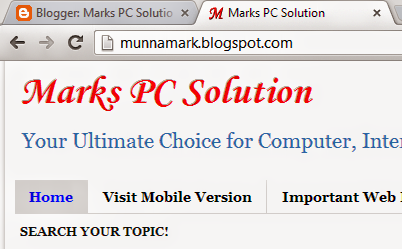
Look at the above image. This is the header style of Marks PC Solution without Navbar and Unnecessary Space. If you follow this post, you will be able to make your header like this one. 


There are also two bonus topics for you! Though these two were published before I'm gonna link them back here. Read them if you think necessary: 

Before removing the navigation bar, your site's header will be look like the image below:


Navigation Bar before Blog Title


And certainly, this bar damages the professional look of your site. I've already published the post about removing the navbar from blogger.  


However, I'm telling you in short about removing the navigation bar. Because to remove the empty space above the header, first you have to remove the navbar from your site. Follow the steps below: 
  1. Hope you're signed in to your blogger account. Go to the dashboard/ design/ setting or whatever you call it.
  2. Now go to the Layout.
  3. Find the Navbar (Usually at the top)
  4. Click the Edit option > Select Off > Save
To know more - Click here


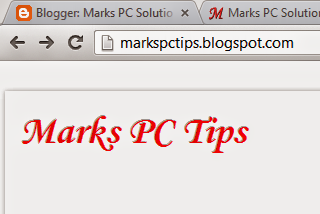
Assuming that you've already removed the Navigation bar from your blogger site. Now After removing the navbar, your header will be look like the image below: 


White Space before the Blog Title

If you have a close look at the above image, you will see there is an unnecessary empty space instead of navigation bar. And it looks very odd. Let's remove it. But before that, make sure you're signed in to your blogger account and navigation bar is removed from your site. Now start: 
  1. Go to the design or dashboard from your blogger account.
  2. Hit on the Template option from the left pane.
  3. Hit on Edit HTML button. (Backup your template to avoid mishap!)
  4. Here you will get the HTML of your template. You need to add a small code in it.
  5. Click on the HTML Code Box then press Ctrl + F to enable search. 
  6. Type </head> in the search box and press Enter. 
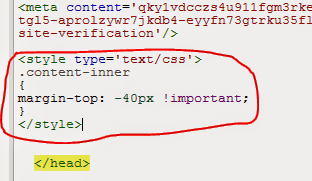
  7. Now copy and paste the below code just before the </head>.
  8. That's it! Hit on the Save Template button, view your blog and see the magic! 
<style type='text/css'>

.content-inner 
margin-top: -40px !important; 
}
</style>

Code should be placed like the image below: 


Code to Remove the White Space above Blogger Header

After successfully placing this code on your site, your site's header will have no unnecessary space on it. We always wish your success as a blogger. Continue with us to get more tips on blogging . . .


Stay with Marks PC Solution to get more interesting IT topics!


Saturday, April 6, 2013

How to Punish Your Site's Contents Thieves?


Do not Copy from Marks PC Solution


If you're a blogger or article writer then you must know how to report a blog or website copying your contents. You should know how to punish the defaulter. There are a number of logical reasons for which you should punish those culprits. In this post I'm gonna try to give you an idea about taking actions against plagiarists


It has been more than a year since I've started blogging. Earlier this blog was very small in terms of number of posts, topics, categories, visitors etc. But now this site has more than 200 posts. Everyday I've to handle many comments and requests. And everyday I get a good number of unique visitors in this site. But with the increasing popularity of the site I've discovered a serious problem! Some fake bloggers are copying posts from here without linking back! 


I spend thousands of my valuable hours to write posts, to design related images, to gather necessary information. And when I see few of my posts published in other blogs without referral link I get disappointed. A post that requires 2 hours to write, being copied in 2 minutes! Doesn't it bother you? 


Not only me, this problem belongs to every popular blog owners and article writers. But what's wrong if your posts are being copied? Or why should you stop someone from copying your posts? Look at the reasons below:

Why Should you Stop the Thieves? 

  • To Protect Search Rank: Google/search engine demands unique articles. So, when someone copies your posts, Google may ignore your site in the search results. In a word, the plagiarist is ultimately reducing your page rank and SEO
  • To Save AdSense Account: If your site is  AdSense approved then you're in the middle of a great trouble! An important requirement of the AdSense Program is unique content. So when your site is being copied your AdSense account could be disabled at any time! Or if you're trying to approve your AdSense account Google may reject this due to the duplicate content.
  • Keep Visitors: Moreover when someone is copying your posts he is actually taking away your potential visitors! That means you're losing new visitors. 
  • Emotional Aspect: And finally, no one has the right to copy your contents. It is your intellectual property. This is really frustrating for your blogging career. If stupid bloggers continue to copy your posts ultimately you will lose your interest in blogging! 


How to Protect your Contents/ How to Report Plagiarism


How you will protect your contents? Using Java Script to disable the copy option? Definitely not. There are two ways/steps you can follow. Follow them sequentially: 


Step 1: First Aid Method

Never skip this system. At the first step you should contact with the site's Admin where you've found your posts. Comment below the post requesting to link back to your site. Or contact with the person directly to give a referral link in your posts. 

If he doesn't agree then request him to remove the copied posts. Most of the cases they may not reply. Sometimes they might dishonor you directly. 

And if the person respond positively then you're lucky. You don't need to proceed to the step 2. 


Step 2: Surgical Treatment 

If the step 1 (First Aid) fails then you should go for the surgical treatment. Hopefully this method will be able to solve your problem. But before taking any action you have to make sure: 
  • Your contents are unique. 
  • Not breaking any rules and regulation.
  • Not copied from another site.

Here I will suggest three tasks for you. Do these properly.
  1. Copyright your Contents: You should copyright your contents. You can do this at MyFreeCopyright. Don't be afraid. It is 100% free! All you need is just to visit the site and register an account with your email ID. Then confirm your account and register your site's link in that site. After registering your link, you should place a widget on your site from myfreecopyright.com. So that they are able to access your site's contents and inform you when other sites copy-paste your posts. 
  2. Identify the Thieves: How do you catch the thieves? Not very tough. Do you know about Copyscape? Copyscape.com will help you to identify the sites that steal your contents. Go to the site. Copy and paste your site's url and search for the duplicate contents. Now you will see the list of URLs that copied your articles. You can also use their free banner. Or you can use premium service provided by copyscape if you want. 
  3. Take Action: This is virtual world. So you can't easily sue against a person for copying your posts. Police, FBI, BSS, Detectives can't solve your problems. Instead of law enforcing agencies you can report to Google DMCA to remove the copied contents. Or you can directly go to this page if that person use blogger blog. Never make wrong appeal. It might be harmful for your site. 


Advice for the Bloggers: 

  • Try to write unique articles
  • Never copy from other sites (even with referral link)
  • Use copyscpace regularly to catch the article thieves
  • Register your site on myfreecopyright.com 
  • Never write anything that breaks laws and regulations
  • When someone copies your posts request him to link back to your site or politely tell him to remove your contents
  • If you fail to prevent stupid persons from copying your contents then go for the legal actions as stated above. 


Advice for the Plagiarist:  

You maybe new in blogging so you might have an intention to copy posts written by others. But why don't you link back to original posts? If you want to be a professional blogger then try to write yourself.

You may not have enough ideas. But if you never try to write yourself then you will never be successful. You can't go a long way by copying the posts written by other bloggers. 

If you would like to share an article on your site, then don't forget to link back to the original post. 

Definitely you will be a good blogger in the future. In that time, if someone copy your contents, how do you feel then? 


You can Also Read:


Stay with Marks PC Solution to get more interesting IT topics!


Tuesday, October 30, 2012

Remove Powered by Blogger Widget from your Blog!


You may wanna remove the powered by blogger text from your blog that shows at the end of the page. But this task is not very easy if you don't know the proper way. If you try to do it just by editing the template, for sure you will not be able to do so! 

Because this text is set up by a widget. Without proper guide you can't find this code! So, in this post you're getting a guide to remove this text. Follow my instruction. 
  1. Sign in to your blogger account. 
  2. Then hit on the template button. 
  3. Click on the Edit HTML option and proceed to the next step.
  4. Then mark the option named     
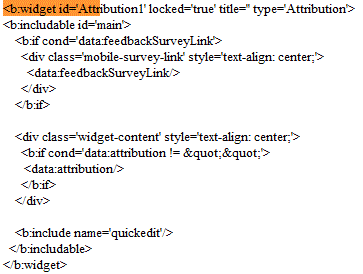
  5. Now you've to delete a minor portion of the template just below this line- <b:section class='foot' id='footer-3' showaddelement='no'/>
  6. Press Ctrl + F to find this line. And select and delete the following lines as shown in the image below.


When you press the delete button you will show the following image:


Hit on the delete widgets button as indicated in the image and save your template. Now view your blog to see the change! 

Stay with Marks PC Solution to get more interesting IT topics!

Saturday, June 30, 2012

Add Facebook Like Button on your Blog!


Today social sites are very much important for webmasters as well as blogger. Because it has a great contribution on SEO. Social sites can influence the visitors to visit your site. But you may not have enough time to share your blog in social sites as you're busy with increasing your site's contents. 

So, in this post I am giving you a simple code by which you can place a Facebook Like button on your blog page. Follow the steps below: 
  1. First go to www.blogger.com
  2. Then go to your blog's layout option.
  3. Now click on Add a Gadget.
  4. Here you'll find a list of gadgets. Scroll down and select HTML/ JavaScript gadget.  
  5. Now copy and paste the following code in the gadget box. 
  6. Now save the gadget and refresh your blog to see the result! 

<div class='sbutton' id='gb'><script src="http://connect.facebook.net/en_US/all.js#xfbml=1"></script><fb:like layout="box_count" show_faces="false" font=""></fb:like></div>


Now, whenever you or someone else click on this like button it will be directly shared on the associated Facebook profile page. But he should be signed in with his Facebook Account. And you'll also get a comment box when you click on this button. 


Stay with Marks PC Solution to get more interesting IT topics!