Showing posts with label SEO. Show all posts

Tuesday, June 11, 2013

How to Disable Blogger Redirection to Local Domains?


How to Prevent blogger from redirecting to country-specific url


If you're running a blog in blogger platform, you should notice, sometimes your site is redirected to local domains. I mean your site is redirected to country specific URL. But it doesn't happen in all countries. Maybe 15 - 20 countries have their own blogger domain. But Google will implement the local domains for blogger blogs in other countries very soon! 


Let's give me an example: 

You know the URL of Marks PC Solution is - http://munnamark.blogspot.com
  • If you're Italian you will see my site's URL as- http://munnamark.blogspot.it
  • A Canadian will see my site's URL as -  http://munnamark.blogspot.ca
  • An Indian will see my site's URL as- http://munnamark.blogspot.in

Okay fine! Blogger has its own local domains for different countries. But what's wrongwith this country specific URL? There are a number of problems: 
  • Your social stats (+1, Likes, Tweets) may fall dramatically due to the variations in domain. 
  • Your search ranking might be affected. 
  • If blogger is banned in a country with the help of local domain, your site can't be visited from there!   
Though Google says, they are trying to minimize the negative consequences of hosting blogger. But why are you waiting for Google's effort? You can force local domains to redirect to .com version of your site with a simple code! 
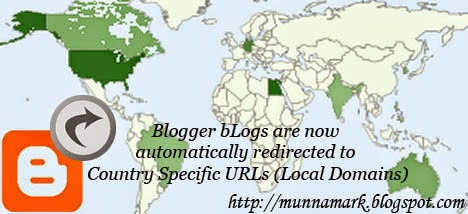

World map indicating blogger blog visitors


Prevent Blogger's from Redirection: 

Officially Google never mentioned any permanent way to stop redirecting. But it said if you type /ncr just after the domain name for example- http://munnamark.blogspot.com/ncr, then it will not redirect to your local domain. 

And if you want to do this for individual post then it should be like that: 
http://munnamark.blogspot.com/ncr/exaplepage

Anyway, as a blog master your shouldn't let the visitors follow any boring way to prevent redirection. Because you can control the redirection by the code below! Okay let's try: 

  1. Make sure you're signed in to your blogger's control panel I mean design or dashboard.
  2. Now go to the template option. (Backup your template if necessary)
  3. Click on Edit HTML. Now you can see the code of your template. 
  4. Hit on the template box and Press Ctrl+F to enable search within the code box.
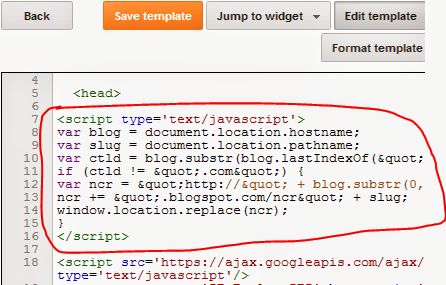
  5. find the <head> of your template and then copy the code below and place it just below the head tag. (Look at the image below)
  6. Save the template. Done! 

<script type='text/javascript'>
var blog = document.location.hostname;
var slug = document.location.pathname;
var ctld = blog.substr(blog.lastIndexOf(&quot;.&quot;));
if (ctld != &quot;.com&quot;) {
var ncr = &quot;http://&quot; + blog.substr(0, blog.indexOf(&quot;.&quot;));
ncr += &quot;.blogspot.com/ncr&quot; + slug;
window.location.replace(ncr);
}
</script>


Prevent your blog from redirecting by a simple code


From now and then your visitors will only be able to visit the .com version of your site. I mean like that: http://munnamark.blogspot.com. 

You can also test whether it works or not. Type http://munnamark.blogspot.it in your browser. But it will redirect you to http://munnamark.blogspot.com. Also check this for your site. 


Removing the Code: 

I don't think it is necessary. For any reason, if you are reluctant to use this code, follow the steps above again. And then at the 5th step, delete the code and save your template. Or if you have a backup of your template, you can also restore it. But deleting the code is much easier. 


What about the Registered/ Custom Domain? 

If you blogger blog is registered I mean if you have a custom domain like .com or .org you don't need implement this code. Because the redirection is not applicable for a site with custom domain. 


What happened if blogger is banned in a country? 

Naturally when blogger is banned by the Govt. of a country the visitors from that country will not be able to see your site. But they will be able to visit the .com version of your site by  using /ncr just after the domain. But if you use the above code in your site, visitors will automatically be able to visit your site!  

I think now you understand the importance of using this code . . . :) 


Stay with Marks PC Solution to get more interesting IT topics!


Thursday, June 6, 2013

Post Writing Guidelines for Bloggers

Top Tips in Writing Blog Posts!

Well this is not an easy topic to write about. You could never imagine how much responsibility is to be taken when you are discussing about any guideline. Because whatever you write as guidelines/ policies these might be applied by other people. If they get benefited then it's your credit. But if they face any problem by following your principles you should be held responsible for that. 

Anyway, I will try my best to provide you some guidelines which I believe must be considered before publishing a post. These tips will be very useful for you 
  • To increase search ranking
  • To increase visitors 
  • To retain existing visitors
  • Most importantly to improve your writing quality


Read the whole post carefully and participate through your valuable comment . . . :) 

  • Post Title: The first and most important part to the search engines to display your site at the first page. Attractive post title is also helpful to encourage visitors to enter your site. The title shouldn't be unnecessary long. And you must try to keep it as meaningful as possible. 
  • Post URL: You can create custom URL/ link for a post. Both blogger and WordPress let your customize the post URL. It is not only important to the search engines but also to the visitors of your site. Read more about customizing post URL.
  • Contents: The most important things to keep your visitors in touch! Your contents should be attractive and useful. Information provided must be accurate. Contents should be written in a clear and easy language. Try to make your contents unique and exclusive. But if you're not able to create unique contents never try to copy and paste from others. This is strictly prohibited by Google. When you write the contents from other website first you have to take permission and then you should refer to that site. 
  • Labels/ Tags/ Keywords: Labeling is also very important. Proper labeling helps the visitors to find the right post within your site. And definitely the labels have a great impact in search results. So you should carefully use labels/ keywords in the posts. But never try to use the irrelevant labels or tags in your posts. If you do so, you could be blacklisted both by the visitors and search engines! Be Careful! 
  • Formatting: Very very important. Make the texts bold, italicize or underline them when and where necessary. Also use different fonts to highlight some parts. Use numbers and bullets when giving a list of something. Use quoted text where applicable. You should keep sufficient space between paragraphs. Never type the whole post in a single para. It makes the reader bore and uneasy. 
  • Search Description: This is a lovely feature of blogger. Usually the first few sentences of a post are shown by search engines in search results. WordPress automatically do this for the users. But if you're the user of blogger blog, then you have to do this manually. This could be boring for you. But this feature lets you customize the search description. Because the first few sentences may not be relevant to your post or may not able to attract visitors. Read more about search description. 
  • Post Length: What is the optimum length for a post? Actually there is no rigid rule. Post should be descriptive enough so that it clarifies your message to the readers. But it doesn't mean that you will make your post unnecessary long. It should be precise, accurate and clear. Most of the bloggers try to write more than 500 words. You can also practice this rule. Because the more you write, the higher is the chance to be matched with the search queries of the visitors. 
  • Language: Your language should be friendly and attractive so that the visitors feel free to read the contents. It should be easy and meaningful. Never try to be over smart in using the language style. 
  • Grammar: Well 100% accurate grammar is not important for you unless you're writing something about language or grammar. But it doesn't mean that you will not care about grammatical accuracy. You should be careful enough to avoid mistakes. If the visitors find too much grammatical errors they may feel bore and lose interest to your site! 
  • Color, Text Alignment, Text Size, Font: These issues are crucial to look your posts attractive and readable. Use of color is okay but only when it's necessary. Black is the best. But when necessary, you can use any color. Text alignment should be justified but when required you can use left, center or right too. Font size shouldn't be too large or too small. It should be readable. Use large text when necessary. You can use any font. But always avoid stylish fonts (ie. Monotype Corshiva, Vivaldi, Vladimir) in normal text. I mean use a font that is easy to read and understand. My personal choice Georgia. 
  • Image: A single image might be worth of thousand words. So you should use relevant image with your post (never copy from others). In case of using image you should consider some factors. Image placement should be proper. Make sure it doesn't looks odd and hinders the visitors to read properly. Image should be attractive and creative. Use the post link with the image. Give it a proper title text and alt text. Avoid extra large size images. Because they consumes data and increase your site's loading time. 
  • Outbound Links: You can also use reference links with your post which may be helpful for the visitors to know more. And this is also important to Google. But never share too much links with the post. 

If you follow these rules I think you will be a good writer for sure. And your site will get more visitors and higher ranking soon. Along with these rules you must ensure that your site loads faster. Visitors never like a slow site. Site's design should be attractive. Never place too much social sharing buttons on your site. Be careful while placing Ads on your site. 


You should also follow my style. I think my posts are properly designed. If you think something is wrong then please inform me. Waiting for your feedback . . . :) 


Stay with Marks PC Solution to get more interesting IT topics!


Thursday, May 16, 2013

Stat My Web: Get Detailed Analysis of Your Site


Stat My Web PNG Image


There are many sites that collects and shows information about blogs and websites. Some of them are very reliable and some of them are not. Alexa, Google Analytics, Web Rank Stats are some of the examples. 


Today I am gonna discuss about such a site that gives you detailed analysis and information about your blog or website. Maybe some of you are familiar with Stat My Web. This website shows you a comprehensive analysis of your site. It provides a statistics summary, inpage analysis, alexa status, safety & security, popular pages, keywords and many other information about your site. 


Look at the image below. This is the statistics summary of Marks PC Solution on Stat My Web.

Website Statistics by Stat My Web


But this is a minor part of the statistics. If you enter the URL of your site on Stat My Web then you will find the details. 


Okay let's find out the statistics for your site. First you need to visit Stat My Web. Remember, no sign up is required! This is a great thing. You don't need any account for getting analysis. There is a search box at the top right corner just below the tabs. You can either search your site by Name (ie. Marks PC Solution) or simply copy and paste the URL of your home page (ie. http://munnamark.blogspot.com). 

I suggest you to enter the URL directly instead of searching it by name. Because information will be gathered automatically if you enter the URL in the search box. 


Analyzing the Results

After entering the URL, results will be arranged in a few parts. 

Brief Description: This is the first part of the result. See the example of Marks PC Solution brief description.  

Munnamark.blogspot.com is ranked #162,025 on the world wide web by Alexa. The lower the Alexa rank, the more popular the website is considered to be. Munnamark.blogspot.com has an estimated earning potential of $118 USD per day from advertising revenue, giving it a value upwards of $38,071 USD. We have found the average page load time to be 0.100369 seconds. This website has a GooglePageRank of 0 (out of 10), and has a reach of 931 average unique visitors per day, with about 8,380 daily average page views.This website is listed in Yahoo directory. The primary IP address is 74.125.227.43. We give this website a SEO score of 23.8%.

Web Statistics Summary: The second part of the result is statistics summary. Here you will get Alexa rank, Google Pagerank, Daily Visitors, Revenue Status etc. 


Inpage Analysis: It gives you a knowledge about the structure of your page. It might be useful for webmasters. I don't know much about it. 


Alexa Traffic Analysis: This part is taken from Alexa. And almost similar to what information you see about your on Alexa. 


Safety and Reputation: This part is taken from the WOT (Web of Trust). It measures the Trustworthiness, Vendor Reliability, Privacy and Child Safety. Marks PC Solution gained Excellent Rating in all the four aspects.


Popular Pages: This part shows the 10 most popular page URLs. With this analysis, you will be able to know what topics are driving the most visitors to your site. 


Keyword Rankings: Here you will find some keywords which play an important role in driving traffic to your site. You can target the keywords which are very popular. 


Others: There are some other tools which are not very important for you. I mean you might have nothing to do with these tools. Such as- HTTP Header Analysis, DNS Records, Directory Listing Analysis, Web Hosting Server Location Map etc. 


Besides you will get more information by navigating the site. Look at the right pane of Stat My Web. There are three sections: 
  • Navigation Menu
  • Advanced Charts
  • Website Tools

The last one is important for you. Yes I mean, Website Tools. There are few tools which may be useful for you. Such as: 
  • Website Worth
  • Domain Look Up
  • IP Address
  • Domain Availability
  • Ping Test
  • Get Website Information
  • Speed Test 

I expect, this post will help you to know about the site Stat My Web. And thus you can get the detailed information about your blog or website. Leave comment to share with us . . . 


Stay with Marks PC Solution to get more interesting IT topics!


Sunday, May 12, 2013

Google Authorship: Show Yourself in the Search Result !!


Google Authorship Program with pen icon


If you search Google very often you may notice some search results appear with an image of a person. Basically it is the thumbnail image of the writer of that content. What do you think of it? How does it appear in the Google search result? Other search engines still don't have this feature. Then how/ why it appears in Google search result? 


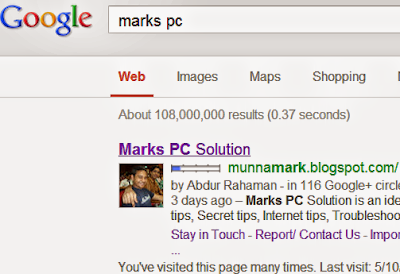
A Search Result Google Authorship Program Enabled Site


Look at the above image. Search item is- marks pc. And the result is Marks PC Solution. You should notice my picture with the site. You can also enable your picture when your site appears in the search result. 

Actually this is a great feature launched by Google. Google named this feature as Google Authorship Program. If you wanna enable this feature for your site then you have to go through few steps which are not very critical at all. I decided to write about it more than a year ago. But failed to publish about it due to the heavy work pressure. 


But believe me, for my site, Marks PC Solution, I didn't enable this feature knowingly! Then how does my image appear in the search results? The answer is my Google Plus Profile. Yes, this feature works for that sites which writers have Google Plus Profile. 

If you already see your image in the search result with your site's link, then you don't need to do anything more. That means the URL of your Website/ Blog is already linked to your profile. Thus this features is already enabled for you. 


About Google Authorship Program

Google authorship program was launched on June 28, 2011. In that time, only a few hundred authors joined this program. Because many people were not familiar with this feature. But day by day, authors are being interested to enable this feature for their sites and contents.

Many of you may think Google considers authorship as a search ranking factor. But to be honest, still it not being used by Google as a search signal. Google uses more than 200 signals to determine search ranking. And in the future authorship program may be used as a search ranking factors. 


How to Enable this Feature? 

Well this is very easy. All you need is just a Google + Profile with a link of your site in that profile. Also make sure the following issues:

  • Make sure you have a high quality Google+ profile picture with a recognizable headshot. I mean your face should be identifiable on that picture. 
  • Make sure a byline containing your name appears on each page of your site. Have a look at the end of this post- Posted by Abdur Rahaman.
  • Make sure byline name and your Google+ profile name are exactly same. 
  • Make sure that your Google+ email address and your site's email address are same. If your site's email address is different then read more. 


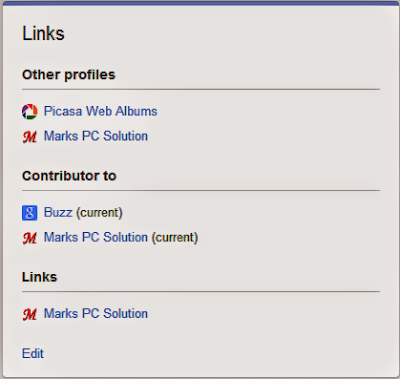
Google+ Profile Links Sections


If you're sure about the above issues then just do the following: 
  1. Go to your Google+ Profile.
  2. Then move to the About tab of the profile.
  3. Now scroll down to the Links section. Look at the above image. 
  4. There are three options available: Other Profiles, Contributor to and Links.
  5. Hit on the Edit option. See the image below. 
  6. Add your site's name and URL here. See the image below. 
  7. Also add your site's name and URL in the Links too. 
  8. Now save it and wait for your picture to be appeared in the search result. It may take few hours to few days depending on how much time is required by Google to crawl your image. 
Editing Contribution Links in Google+ Profile


Finally, though Google doesn't consider authorship program as a search ranking signal, still it might be an important factor in SEO. You can consider this exactly as search description. Often people choose a site from search result by reading the search description of that page. And if the image of an author is familiar to the visitors and if that author is popular among them, then it will be very helpful for the visitors to pick the site from the search results! 


So what do you think? Isn't it also important to increase your site's visitors? Enable it now to get advantage!!! 


Stay with Marks PC Solution to get more interesting IT topics!


Friday, May 10, 2013

Protect Your Site's Contents by DMCA


DMCA Copyright Logo PNG


Hello Bloggers! 

Only a few weeks ago I published a post about protecting site's contents. In that post, I discussed about: 
  • Why you need to stop others who copy from your site?
  • How to protect your contents?
  • How to report plagiarism?
  • How to copyright your contents?
  • How to identify thieves?
  • How to take action against plagiarists? 


So before reading this post please have a look at the following post: 

How to Punish Your Site's Contents Thieves?


This post is absolutely targeted for the Bloggers, Site owners or Site Admins. Because, day by day, copyright is being an important issues of the web. If you're a blogger or site owner, you need to protect your contents from plagiarists. And if you're someone like plagiarist then you need to stop stealing contents from others! 

Well the DMCA, Digital Millennium Copyright Act, was established in 1996 to protect the contents of web. DMCA provides the services to protect your digital contents- text, images, site's contents etc. 

DMCA has their own badges which you can place in your sites to warn the plagiarists. When you place the DMCA badge on your site it will be scanning and adding the URLs of your sites. It may take up to 48 hours to add all of the links of your site in DMCA database. 

   
Let's implement DMCA badge on your site! Okay start - 
  1. Sign up at DMCA by your email. 
  2. You should receive a confirmation mail including your username and password. Later you can change your password by logging in.
  3. Now go to the Protection Badges Tab to find a badge for your site. 
  4. There are many badges in different colors, sizes and texts. Choose a badge that is suitable for you. 
  5. Copy the code just under the badge and paste it in your site's html. Or if you're using blogger or wordpress, you can just place it as HTML gadget. 
  6. When you're done, the DMCA will continue to scan your site to add the URLs to the database. 

You will be able to check the protected pages under Protection Badges tab. 


DMCA Takedown Service:

Well this service is only available for premium or pro members. If you're premium member of DMCA, you will be able to file a case against the sites which copy your contents. You can take down the URLs that includes your site's contents. 

You've to pay DMCA to launch a takedown. When you pay the money, they will remove the contents of the site that copies your contents. 


Takedown Process:

There are two ways you can launch take down: 
  • Go to the Managed Cases Tab. And then hit on Add Takedown Case option. Now edit your contact information if necessary. Enter the URL of the criminal site at the left side. And enter the URL of your content at the right side. Write a brief description at the box below. Then save it. Immediately you will get a confirmation mail. After paying the money, DMCA will start working to fix the issue. 
  • Another way to launch takedown is from the Protected Pages tab. Go to the Protected Pages first. Here you will see the list of protected pages. And you will find an option named Launch Takedown with every URL. Hit on this option to launch takedown. Enter the Stolen Content URL at the left box. Right box is already filled up by your site's URL. 

And please read this post- How to Punish Your Site's Contents Thieves? - to gain a better knowledge about protecting site's contents. 


Hopefully this post will help you to punish the plagiarists. Contact us if you face any problem with plagiarists. 


Stay with Marks PC Solution to get more interesting IT topics!


Wednesday, April 17, 2013

Replace your Traditional Comment Box with DISQUS!


DISQUS PNG Logo


Hi! Start writing after three days. Because I was so busy last few days, and don't get enough time and idea to write about. Today I will talk about how to replace the traditional comment box of blogs or website with a beautiful disqus comment box. 


You might notice many websites or blogs (WordPress, Blogger, Tumbir) doesn't have any traditional comment box. They use comment luv or disqus. Coomment luv is better than disqus but you have to pay for it. But you're getting disqus for free without charge! So why don't try it? 

By the way if you don't like to add any third party comment box then please read the post: Full Tutorial on Blogger Comment Optimization. This will help you to understand how to optimize the traditional blogger comment option. 

DISQUS works with almost any platform: 
  • Blogger
  • WordPress
  • Drupal
  • Tumbir
  • HTML & JS
  • Other Websites/ Blogs


If you wanna implement this comment option in your site first you have to register an account. Sign up here by email and then confirm it. Now do the following:
  1. After sign up, Go the dashboard. 
  2. Now you have to add your site by giving its Name, URL and Shortname and then continue. 
  3. Now you have to go to the Settings option to optimize the comment options.
  4. You can also use the tools option to import your existing comments into Disqus! 
  5. Now you have to find the code. It should be like that- Get this for your site or something like that. 
  6. Then you have to edit your site's template or code. If you are using blogger then please  Backup your Blogger Template avoid any accident so that you can get your existing template back without losing something.
  7. For WordPress site the Disqus have a plugin. You have to just upload a file into your WordPress site. Then it will be automatically added. 

I have another surprise for you! By implementing DISQUS on your site, you can publish Ads too! Go to the Discovery under settings option. There you will find four options. If you choose  any of the first three options other than Just Comments Ads will be place just below the comment box. Thus you can monetize your site too!  


I also implemented disqus on Marks PC Solution. But after using it for few hours I got disappointed. So I removed it. I like Commen Luv. But they have no free service. Comment Luv is really professional. I am gonna miss it! :(


Stay with Marks PC Solution to get more interesting IT topics!


Saturday, April 6, 2013

How to Punish Your Site's Contents Thieves?


Do not Copy from Marks PC Solution


If you're a blogger or article writer then you must know how to report a blog or website copying your contents. You should know how to punish the defaulter. There are a number of logical reasons for which you should punish those culprits. In this post I'm gonna try to give you an idea about taking actions against plagiarists. 


It has been more than a year since I've started blogging. Earlier this blog was very small in terms of number of posts, topics, categories, visitors etc. But now this site has more than 200 posts. Everyday I've to handle many comments and requests. And everyday I get a good number of unique visitors in this site. But with the increasing popularity of the site I've discovered a serious problem! Some fake bloggers are copying posts from here without linking back! 


I spend thousands of my valuable hours to write posts, to design related images, to gather necessary information. And when I see few of my posts published in other blogs without referral link I get disappointed. A post that requires 2 hours to write, being copied in 2 minutes! Doesn't it bother you? 


Not only me, this problem belongs to every popular blog owners and article writers. But what's wrong if your posts are being copied? Or why should you stop someone from copying your posts? Look at the reasons below:

Why Should you Stop the Thieves? 

  • To Protect Search Rank: Google/search engine demands unique articles. So, when someone copies your posts, Google may ignore your site in the search results. In a word, the plagiarist is ultimately reducing your page rank and SEO! 
  • To Save AdSense Account: If your site is  AdSense approved then you're in the middle of a great trouble! An important requirement of the AdSense Program is unique content. So when your site is being copied your AdSense account could be disabled at any time! Or if you're trying to approve your AdSense account Google may reject this due to the duplicate content.
  • Keep Visitors: Moreover when someone is copying your posts he is actually taking away your potential visitors! That means you're losing new visitors. 
  • Emotional Aspect: And finally, no one has the right to copy your contents. It is your intellectual property. This is really frustrating for your blogging career. If stupid bloggers continue to copy your posts ultimately you will lose your interest in blogging! 


How to Protect your Contents/ How to Report Plagiarism? 


How you will protect your contents? Using Java Script to disable the copy option? Definitely not. There are two ways/steps you can follow. Follow them sequentially: 


Step 1: First Aid Method

Never skip this system. At the first step you should contact with the site's Admin where you've found your posts. Comment below the post requesting to link back to your site. Or contact with the person directly to give a referral link in your posts. 

If he doesn't agree then request him to remove the copied posts. Most of the cases they may not reply. Sometimes they might dishonor you directly. 

And if the person respond positively then you're lucky. You don't need to proceed to the step 2. 


Step 2: Surgical Treatment 

If the step 1 (First Aid) fails then you should go for the surgical treatment. Hopefully this method will be able to solve your problem. But before taking any action you have to make sure: 
  • Your contents are unique. 
  • Not breaking any rules and regulation.
  • Not copied from another site.

Here I will suggest three tasks for you. Do these properly.
  1. Copyright your Contents: You should copyright your contents. You can do this at MyFreeCopyright. Don't be afraid. It is 100% free! All you need is just to visit the site and register an account with your email ID. Then confirm your account and register your site's link in that site. After registering your link, you should place a widget on your site from myfreecopyright.com. So that they are able to access your site's contents and inform you when other sites copy-paste your posts. 
  2. Identify the Thieves: How do you catch the thieves? Not very tough. Do you know about Copyscape? Copyscape.com will help you to identify the sites that steal your contents. Go to the site. Copy and paste your site's url and search for the duplicate contents. Now you will see the list of URLs that copied your articles. You can also use their free banner. Or you can use premium service provided by copyscape if you want. 
  3. Take Action: This is virtual world. So you can't easily sue against a person for copying your posts. Police, FBI, BSS, Detectives can't solve your problems. Instead of law enforcing agencies you can report to Google DMCA to remove the copied contents. Or you can directly go to this page if that person use blogger blog. Never make wrong appeal. It might be harmful for your site. 


Advice for the Bloggers: 

  • Try to write unique articles
  • Never copy from other sites (even with referral link)
  • Use copyscpace regularly to catch the article thieves
  • Register your site on myfreecopyright.com 
  • Never write anything that breaks laws and regulations
  • When someone copies your posts request him to link back to your site or politely tell him to remove your contents
  • If you fail to prevent stupid persons from copying your contents then go for the legal actions as stated above. 


Advice for the Plagiarist:  

You maybe new in blogging so you might have an intention to copy posts written by others. But why don't you link back to original posts? If you want to be a professional blogger then try to write yourself.

You may not have enough ideas. But if you never try to write yourself then you will never be successful. You can't go a long way by copying the posts written by other bloggers. 

If you would like to share an article on your site, then don't forget to link back to the original post. 

Definitely you will be a good blogger in the future. In that time, if someone copy your contents, how do you feel then? 


You can Also Read:


Stay with Marks PC Solution to get more interesting IT topics!


Thursday, March 28, 2013

Statistics of Marks PC Solution on Alexa


Marks PC Solution Logo Alexa Logo PNG


Dear readers! Hope you're fine. And also hope you are getting something from this site. At least we are trying hard to provide useful tips for you. But this post is not related to any tips or tricks. You have the right to know about Marks PC Solution. In this post I will show you the statistics and ranking of Marks PC Solution on Alexa.

Hope you all know about Alexa - The Web Information Company.  Alexa collects the information about the websites. Normally a new site is not listed on Alexa. But when people use this site with Alexa toolbar or when this site has enough visitors, in that time Alexa enlists that site in its directory. 

Marks PC Solution was started at the end of 2011. In that time the ranking was more than 25,000,000. But now its 3 month ranking is only 192,000! And one month ranking is 162,000! 

You know without your contribution it is not possible to improve the rank so fast. Look at the Alexa Widget below. It shows the live rank of Marks PC Solution (Changes every day).


Statistics Summary for munnamark.blogspot.com

Munnamark.blogspot.com has a three-month global Alexa traffic rank of 192,937. About 45% of visits to the site are bounces (one pageview only). Search engines refer approximately 2% of visits to the site. Munnamark.blogspot.com is based in Bangladesh. Visitors to the site spend approximately fourteen minutes per visit to the site and 79 seconds per pageview.

Munnamark.blogspot.com’s Regional Traffic Ranks

Country
Rank

If you continue with Marks PC Solution certainly it will be easier for us to get a better ranking. 

Stay with Marks PC Solution to get more interesting IT topics!